SquirrelOps for macOS · Free
Know your network. Control your network.
Your home network has dozens of connected devices. Do you know what all of them are doing right now?
Release 2.0.3 was tested in protected CI, independently approved, Developer ID-signed, Apple-notarized, checksummed, and attested.
New in 2.0.3: Build Local Sensor
The signed package now installs the app, sensor, and privileged helper together. Choose Build Local Sensor on first launch and the app enrolls automatically. There is no Terminal step or setup key, and macOS asks for one administrator approval during installation.
- Installer now completes after a stable sensor handoff instead of waiting for every saved decoy to restore, removing the multi-minute “less than a minute” stall.
- Build Local Sensor keeps retrying during a decoy-heavy upgrade and reports elapsed time instead of showing Sensor Not Responding after one retry.
- The Help menu can jump directly to every section in the built-in guide.
Security note for upgrades from before 2.0.2
If you configured Home Assistant, Slack, or classifier credentials in a release before 2.0.2, rotate them after installing 2.0.3. Those releases cached configuration responses unencrypted. Current releases purge that cache, but they cannot undo a past disclosure.
The installer, checksum, and canonical release notes are public, immutable release assets. You can also view the complete GitHub release.
To verify the package yourself, paste this command into Terminal. It assumes the package is in your default Downloads folder:
shasum -a 256 ~/Downloads/SquirrelOpsHome-2.0.3.pkg | cut -c 1-64Terminal should print:
252bd6bd559b4dbf578410aa959611675d3b627163ee885f404857cb67ab23f8Installing for the first time? to choose the local or remote sensor path.
Choose where the sensor runs
For normal setup on this Mac, install the signed package and choose Build Local Sensor. The app creates its private key in macOS Keychain and enrolls with the packaged sensor automatically over mutual TLS. Closing the app does not stop protection; the sensor continues across logins and restarts.
Connect to Another Sensor
If the sensor runs elsewhere on your network, choose Connect to Another Sensor, select the sensor discovered through mDNS, and enter its one-time setup key. Certificate storage, mutual TLS, and the authenticated connection stay the same.
Use Setup Key on this Mac
If automatic local enrollment cannot finish, Use Setup Key remains available as a recovery path. Open Terminal and run:
sudo -u _squirrelops \
  /Library/SquirrelOps/sensor/python/bin/python3 \
  -m squirrelops_home_sensor \
  --config /Library/SquirrelOps/sensor/config.yaml \
--show-pairing-codeEnter your Mac administrator password when prompted, then paste the displayed 20-character key into the app. The key expires after 10 minutes or after it is used.
If the key expires, restart the sensor with this command, then run the pairing command above again:
sudo launchctl kickstart -k system/com.squirrelops.sensor
The App
A native macOS experience.
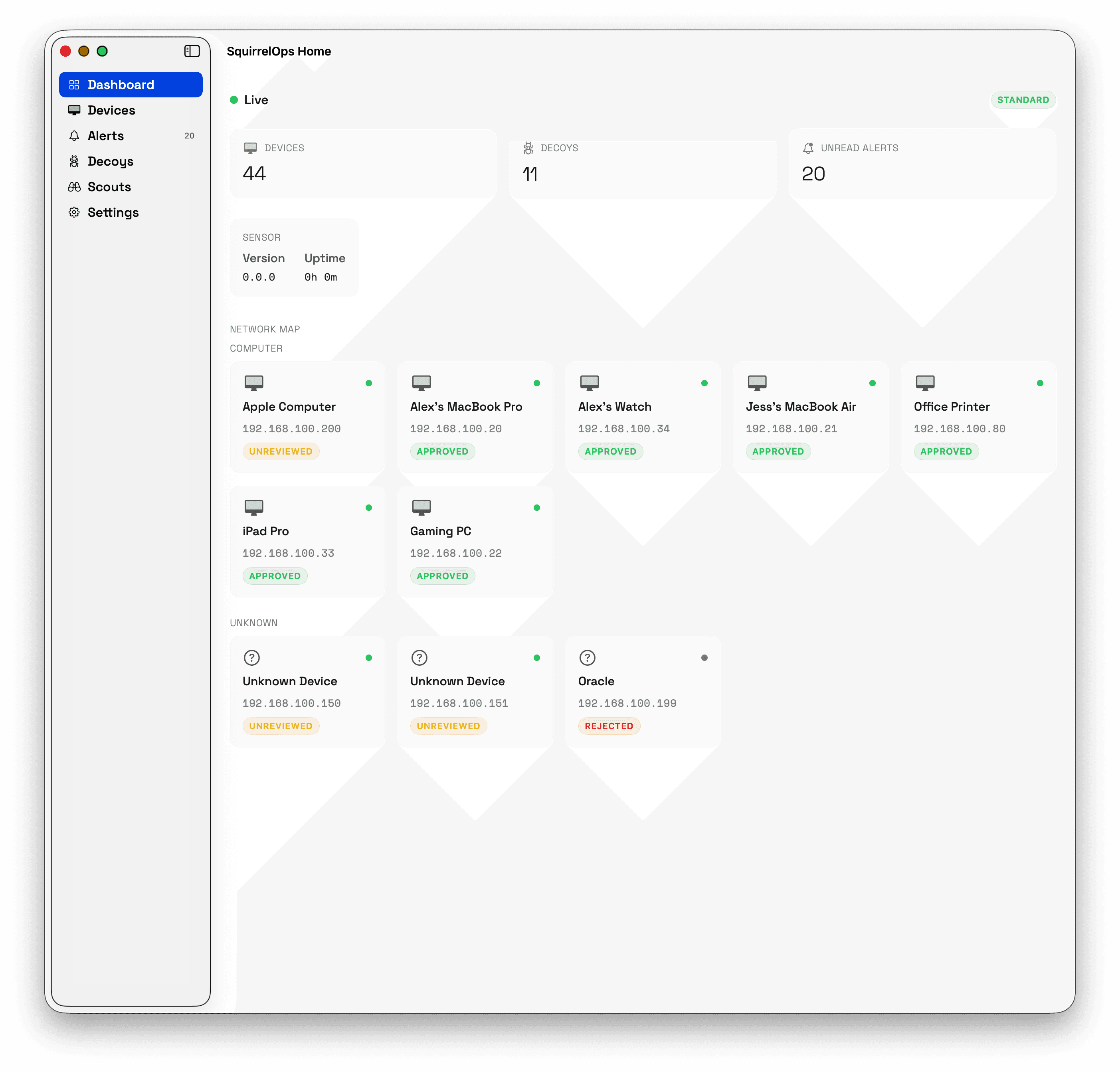
Dashboard1 / 7
Your router sees a list of IP addresses. Maybe it shows you a hostname like ESP_2F8A01 or unknown-device-7. That's about it. Meanwhile, every smart speaker, security camera, IoT sensor, and forgotten Raspberry Pi on your network is making connections, and you have no idea where those connections go or whether every device on your LAN actually belongs to you.
SquirrelOps for macOS changes that. It watches your network, knows every device by name, and tells you the moment something unexpected happens.
What It Does
Four layers of network awareness.
Discovers and identifies every device
SquirrelOps Home continuously scans your LAN and builds a complete inventory of everything connected. It doesn't just show you MAC addresses. It fingerprints devices using multiple discovery methods and classifies them by type. That mystery device at 192.168.1.47? It's your partner's Kindle. The one at .83? That's the Philips Hue bridge in the living room. Optional AI classification can point at a model running on your own hardware, so device identification never has to leave your home.
Learns what normal looks like
During a short learning period, SquirrelOps Home observes your network's natural rhythms: which devices talk to each other, what ports they use, when they're active. Once it knows your baseline, it alerts you when something changes: a new device appears, a known device starts behaving differently, or a connection pattern breaks from the norm.
Deploys decoy tripwires
This is a capability most consumer network scanners don't have. It places realistic-looking fake services on your network: a file share with enticing names, a fake Home Assistant instance, a development server with debug endpoints. These decoys are tailored to blend in with what's actually running on your LAN. Your real devices have no reason to interact with them, so a decoy trip is a strong signal something's wrong, not background noise.
Plants credential canaries
SquirrelOps Home can scatter realistic-looking credentials throughout your network: fake AWS keys, SSH private keys, .env files with database passwords, GitHub tokens. These files sit quietly until someone (or something) tries to use them. The moment a canary credential is accessed, you get an alert. If malware is crawling your file shares or an unauthorized user is poking around, you'll know.
How It Works
Set it up once. Forget about it.
SquirrelOps for macOS has two parts: a lightweight sensor that watches your network and a native app that serves as your control plane. The signed package installs both on the same Mac. macOS asks for one administrator approval, then Build Local Sensor enrolls the app automatically without a Terminal command or setup key.
The sensor does the heavy lifting: scanning, fingerprinting, running decoys, monitoring baselines, and storing everything in a local database. The app keeps its private key in macOS Keychain and connects to the sensor over mutual TLS. You can see your device inventory, manage decoys, review alerts, and configure notifications without sending that data to a cloud service.
Already run a sensor elsewhere on your network? Choose Connect to Another Sensor and keep the existing one-time setup-key flow.
Set it up once, and it runs quietly in the background. You'll hear from it only when it matters.
What You Get
Confidence in your own network.
A complete picture of your network
See every device, when it joined, what ports it exposes, and how it behaves over time. Spot unfamiliar devices instantly instead of wondering whether that new entry in your router's client list is your kid's new phone or something you should worry about.
Alerts you actually trust
Most security tools bury you in notifications until you start ignoring them. SquirrelOps Home takes the opposite approach. Decoy trip alerts are structurally impossible to trigger by normal activity. When your phone buzzes, it means something.
Insight without surveillance
SquirrelOps Home analyzes connection metadata: which device talked to which, on what port, and when. It never performs deep packet inspection and never reads the content of your traffic. It's security through awareness, not surveillance.
Push notifications where you look
Get alerts on your iPhone or Mac through Apple Push Notifications. Prefer Slack? That works too. You choose where and how you want to be notified.
What It Isn't
It watches. It learns. It alerts. That's it.
Not a firewall.
SquirrelOps doesn't block traffic, throttle connections, or modify anything on your network. It doesn't require you to change your router, install browser extensions, or redirect your DNS.
Not a cloud service.
There's no account to create, no subscription to manage, and no telemetry being sent anywhere. Your device inventory, behavioral baselines, and alert history live in a local database on your own hardware.
Who It's For
Built for people who care about their network.
Smart home enthusiasts who have dozens of IoT devices and want to know they're all behaving as expected.
Privacy-conscious households who want network visibility without handing their data to a cloud service.
Remote workers who want confidence that their home office network is clean.
Anyone who has ever looked at their router's device list and thought, I don't recognize half of these.
Built on Proven Technology
Enterprise-grade engines.
Home-network simplicity.
SquirrelOps for macOS packages the same PingTing monitoring engine and ClownPeanuts deception engine that power the SquirrelOps Enterprise platform, adapted for home networks and wrapped in a native macOS experience. The deception techniques running on your LAN are the same ones built for enterprise environments. They just happen to work exceptionally well at catching anything that doesn't belong on your home network, too.
FAQ
Common questions.
Is my network data sent to the cloud?
No. SquirrelOps for macOS is entirely local. Your device inventory, behavioral baselines, and alert history live in a local database on your own hardware. There is no account to create, no subscription, and no telemetry sent anywhere.
What devices can SquirrelOps monitor?
Any device connected to your local network: smart speakers, security cameras, IoT sensors, phones, laptops, Raspberry Pis, and anything else with an IP address. The app discovers devices via ARP and nmap scanning, then fingerprints and classifies each one.
How do decoy tripwires work on a home network?
SquirrelOps places realistic-looking fake services on your network: file shares, admin panels, development servers. Your real devices have no reason to interact with them, so a decoy trip is a strong signal something unauthorized is happening.
Does it slow down my network?
No. SquirrelOps analyzes connection metadata: which device talked to which, on what port, and when. It never performs deep packet inspection and never reads the content of your traffic. The sensor runs as a lightweight background process.
Is SquirrelOps for macOS really free?
Yes. The app is free to use for personal, research, and educational purposes. Commercial use requires a separate license. The current signed installer, checksum, and release notes are available from the public GitHub release.
Free. Local. Yours.
Free for personal use. Download the signed, notarized installer and verify it against the published checksum before installation.